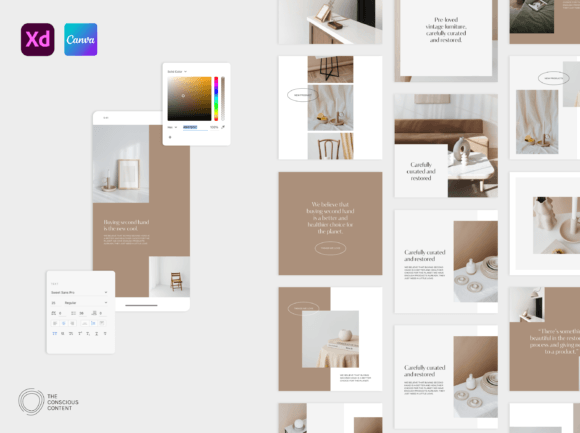
April Social Pack: 170 Canva & XD Templates
Building a cohesive social media presence often feels like a full-time job, especially when you’re juggling the actual work of running a business. You know the struggle: you have a great photo, a solid caption, but you open your design app and stare at a blank canvas. This creative block is where the Insta Canva Templates April pack steps in. It is not just a collection of random designs; it is a strategic toolkit designed to bridge the gap between a raw idea and a polished, professional feed. With 170 templates available in both Adobe XD and Canva, this pack is built for the modern creator who values flexibility and speed without sacrificing style.
Sophisticated Minimalism Meets Playful Design
The defining characteristic of this social pack is its visual balance. In the world of modern typography and layout, minimalism is often equated with boring, but that is not the case here. The April pack utilizes a sophisticated minimal aesthetic that relies on negative space to let your content breathe. However, it introduces personality through specific graphic elements—namely, collage compositions and oval shapes. These elements prevent the designs from feeling sterile. The oval graphics offer a soft, playful counterpoint to the rigid grid structures typically found in social media graphics. This combination allows your brand identity to feel approachable yet high-end, a difficult balance to strike when designing from scratch.
When evaluating design assets, versatility is key. This pack includes a mix of aspect ratios—standard squares (1080×1080), portrait orientation for maximum feed real estate (1080×1350), and vertical stories (1080×1920). This variety ensures that your visual hierarchy remains consistent regardless of where your audience encounters your content. Whether they are scrolling through the feed or tapping through stories, the visual language remains unified.
Practical Application: Where These Templates Shine
While these are marketed as Instagram templates, their utility extends far beyond a single platform. As a designer or entrepreneur, you should look at these files as foundational design assets for your entire digital ecosystem.
For social media graphics, the drag-and-drop interface of Canva (or the precision of Adobe XD) allows for rapid content creation. The inclusion of 1080×1350 portrait templates is particularly valuable for feed posts, as this aspect ratio takes up more screen real estate on mobile devices, naturally increasing engagement time. The 50 included icons (400×400 px) are perfect for creating highlight covers that look custom-made, ensuring your profile page looks curated rather than chaotic.
However, think outside the Instagram box. The 20 bonus presentation slide templates (1920×1080 px) are a hidden gem. If you are pitching to clients, creating a web design mood board, or hosting a webinar, these slides ensure your professional image carries over from your social feed to your business proposals. You can use the collage elements to create dynamic mood boards within your presentations, showcasing textures, product shots, and color palettes in a visually engaging way.
Customization and Typography Strategy
A template is only as good as its ability to adapt to your specific brand identity. The April pack is built for customization. You aren't just swapping photos; you are encouraged to manipulate the layout. The "collage element" mentioned in the features is particularly effective for brands that are service-based or product-heavy. It allows you to aggregate multiple images into a single, cohesive frame, which is a staple of high-end editorial design and packaging design aesthetics.
Regarding modern typography, the templates provide a strong baseline. You have the freedom to implement your own font pairing strategy. If your brand uses a serif font for headings and a sans serif font for body text, the text blocks in these templates are sized to accommodate that hierarchy. The "sophisticated minimal" vibe of the April pack pairs exceptionally well with clean sans serifs, but don't be afraid to introduce a handwritten font or script font for accents to soften the look further. The layouts are spacious enough that even a decorative display font won't clutter the design.
Streamlining Your Workflow with Dual Formats
One of the strongest selling points of the Insta Canva Templates April pack is the inclusion of both Adobe XD and Canva files. This is a massive advantage for teams and freelancers.
If you are a designer who prefers vector precision and the ability to link assets, Adobe XD is your playground. The pack includes a user guide and links to tutorials, acknowledging that XD has a steeper learning curve than Canva. Conversely, if you are a business owner, blogger, or content creator who wants to edit on the fly, the Canva integration is seamless. You can change brand colors globally or swap out images using the native drag-and-drop tools without needing to understand complex software.
This dual-format approach also future-proofs your assets. As your business grows, you might move from DIY design to hiring a professional. Passing these XD files to a freelancer makes it easy for them to maintain your aesthetic while working at a professional level. It ensures that your brand identity remains consistent whether you are doing the work or outsourcing it.
Building Recognition and Consistency
Consistency is the currency of trust in digital marketing. When a user visits your profile, they make a split-second judgment based on visual cohesion. Using the Insta Canva Templates April pack helps enforce this consistency. The oval motifs and collage layouts become recognizable signatures of your brand over time.
This isn't just about looking "pretty"; it's about readability and visual hierarchy. By using a consistent set of templates, your audience learns where to look. They recognize the style of your quotes, the layout of your announcements, and the format of your stories. This recognition reduces friction and increases engagement. You stop being background noise and start being a recognizable entity.
Ultimately, these templates serve as a launchpad. They provide the structure and the professional polish that usually requires hours of design work. By utilizing the Insta Canva Templates April, you free up your time to focus on what matters: the message, the product, and the community you are building.