Streamline Your Pitch: Using Tech Management PPT Templates
When you are preparing to present a complex idea—whether it is a new software launch, a strategic business pivot, or a quarterly review—clarity is your most valuable asset. You might have the most groundbreaking data in the world, but if your presentation looks disjointed or cluttered, your audience will struggle to trust the message. This is where the Technology Management - PPT Templates come into play. These aren't just static slides; they are a professional framework designed specifically for the modern business landscape. They serve as a blank canvas that balances structure with creative freedom, ensuring your content stands out without overwhelming your clients or partners.
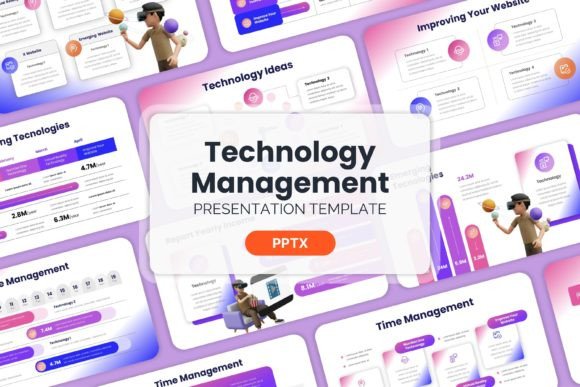
Unlike rigid, overly-themed templates that lock you into a specific aesthetic, this PowerPoint template set focuses on organization and flow. The design personality is clean, corporate, and modern. It avoids the distracting "flashy" elements often found in amateur designs, opting instead for a sophisticated visual hierarchy that guides the viewer's eye naturally from the headline to the supporting data. It is the kind of design asset that says, "We take our business seriously," making it an essential tool for anyone in the tech sector or startup ecosystem.
The Anatomy of a Professional Presentation
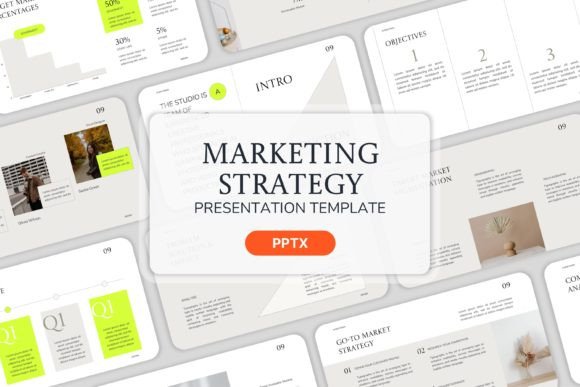
The first thing you will notice about the Technology Management - PPT Templates is the attention to detail in the slide structure. The "fully organized" feature mentioned in the product description is not just a buzzword; it is the core of how this template functions. When you open the file, you aren't greeted with a chaotic mess of shapes. Instead, you find 15 distinct slides that cover the essential narrative arcs of a business presentation. You have dedicated spaces for introductions, problem statements, solutions, timelines, and team bios.
From a design perspective, the inclusion of Master Slides is a game-changer. For those who have spent hours manually adjusting font sizes on slide 47 only to realize it needs to match slide 3, the Master Slide feature automates consistency. It ensures that your typography, margins, and color schemes remain uniform throughout the deck. This consistency is vital for establishing a professional brand identity. If your company uses specific hex codes for its branding, you can easily adjust the color scheme within the template once, and watch as the entire presentation updates to reflect your corporate identity.
Furthermore, the use of image placeholders is a subtle but powerful design choice. In modern typography and layout design, whitespace is just as important as the content itself. These placeholders guide you to add your own high-resolution images without breaking the visual grid. Because the zip file contains no pre-loaded heavy images, the file size remains manageable, allowing for quick loading times and easy sharing—crucial factors when you are pitching to busy executives.
Visual Style and Strategic Application
While this is a PowerPoint template, it borrows heavily from the principles of modern typography and editorial design. The layout likely utilizes a grid system that balances text-heavy sections with ample breathing room. This approach prevents "death by PowerPoint," where audiences disengage because of information overload. The visual style is versatile enough to act as a sans serif font dominated layout, which is currently the gold standard for readability in web design and digital presentations.
Where does this template fit best? Its applications are broad, but it shines brightest in specific scenarios:
- Startup Pitch Decks: When seeking investment, the visual presentation of your business model is often the first impression. This template provides the structure needed to explain complex technological solutions simply.
- Marketing Strategy: For agencies or freelancers presenting a campaign strategy, the organized slides allow you to break down timelines, deliverables, and KPIs clearly.
- Internal Planning: It is excellent for quarterly business reviews (QBRs) where data visualization and clear reporting are necessary for stakeholder buy-in.
- Product Launches: Use the image placeholders to showcase product mockups and feature lists in a way that feels cohesive and professional.
The "personality" of the design is adaptable. Because it starts as a clean slate, it can be styled to feel sleek and futuristic for a SaaS company, or grounded and reliable for a logistics firm. It doesn't dictate the mood; it supports whatever mood your brand requires.
Practical Guidance for Customization
To get the most out of the Technology Management - PPT Templates, you need to treat it as a dynamic tool rather than a static file. Here is some practical advice for integrating this asset into your workflow:
Font Pairing and Typography: While the template sets the layout, you have control over the typeface. Since the design is professional and creative, consider pairing a bold display font for your headers with a highly legible serif font or sans serif font for the body text. Avoid using script fonts or handwritten fonts for large blocks of text, as they can compromise readability on a projected screen. Instead, reserve any decorative typography for accent headers or title cards to maintain a professional edge.
Visual Hierarchy and Images: The template relies on you to supply the context. When using the image placeholders, choose images that are high-quality and relevant. Avoid generic stock photos of people shaking hands. Instead, use images that tell a story about your specific technology or team. If you are presenting data, ensure your charts match the color scheme of the template. This attention to detail reinforces your brand identity and makes the presentation feel like a bespoke creation rather than an off-the-shelf solution.
Commercial Readiness: Because this is a premium design asset, it is built for commercial use. You can confidently use it to introduce your company to high-stakes business partners. The organized structure ensures that even if you aren't a seasoned designer, your output will look like it was crafted by a professional. It removes the guesswork from layout, allowing you to focus entirely on the quality of your content and the strength of your offer.
Ultimately, the Technology Management - PPT Templates serve as a bridge between your raw ideas and a polished, client-ready presentation. It streamlines the design process, ensures visual consistency, and provides the professional credibility needed to take your projects to the next level.