Adobe Illustrator Box Templates Vol.1: 50 Vector Designs
Creating physical products requires precision. Whether you are an entrepreneur shipping goods or a crafter making favors, the unboxing experience starts with the container. However, designing packaging from scratch is often tedious and error-prone. This is where Adobe Illustrator Box Templates Vol.1 enters the conversation. This collection provides 50 Box templates in .ai Adobe Illustrator format, offering a robust foundation for your packaging needs. Because this is a vectorial product, you maintain complete control over scale and resolution, ensuring your designs remain crisp from the digital screen to the physical shelf.
Streamlining Packaging Design for Professionals
For designers and marketers, time is a valuable resource. Instead of calculating die-lines and bleed areas manually, these templates provide a pre-made structural framework. The collection includes a variety of shapes and styles suited for different industries. You might find standard tuck-end boxes for retail goods, pillow boxes for small gifts, or sleeve designs for luxury items. The visual personality of this pack is purely functional and technical. It is not about decorative flair but rather about accurate engineering. This makes it a versatile design asset for anyone involved in packaging design.
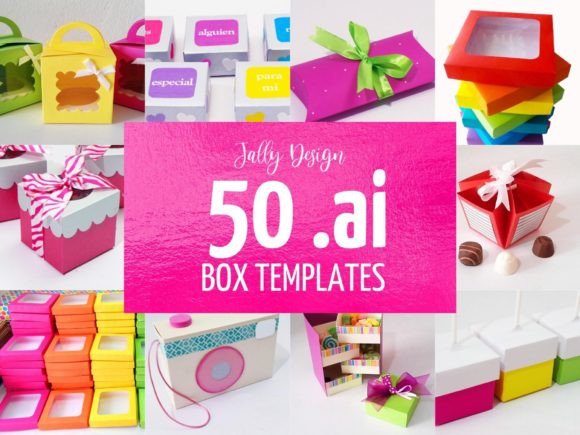
It is important to clarify a specific detail regarding this product. The product images often show finished examples with colors and graphics. However, Adobe Illustrator Box Templates Vol.1 focuses on structure. Decorations and embellishments are not included in this product. The photos merely demonstrate how the templates can be customized. This blank-canvas approach is actually a strength. It allows you to apply your own brand identity without fighting against existing styles. You bring the creativity; the template brings the geometry.
Technical Precision and Vectorial Quality
The core appeal of this collection lies in its file format. Being a vectorial product, the paths are mathematically precise. When you scale a vector box template up or down, the lines stay sharp. This is critical for commercial font and graphics integration. If you are applying a premium font or a complex logo to the side of a box, you need the container to be flawless. Rasterized templates often result in jagged edges or incorrect dimensions when resized. With Adobe Illustrator (.ai) files, you can adjust the dimensions to fit your specific product requirements with millimeter accuracy.
However, there is a technical prerequisite. Please, be sure your software or application is able to work with this format file. Adobe Illustrator is the industry standard for this type of vector work. While other programs might open .ai files, they may not preserve the editable paths or layers correctly. If you are serious about packaging design, having access to Illustrator is essential for utilizing these templates effectively.
Structural Variety and Application
The set includes 50 Box templates, which offers significant variety. This volume allows you to experiment with different form factors for a single brand or use different styles for entirely different projects. Consider the following practical applications for this collection:
- E-commerce Shipping: Customize a sturdy mailer box template to create a branded unboxing experience for your online store.
- Retail Packaging: Use a display-style box template to design packaging that stands out on a crowded shelf.
- Event Planning: Create small gift boxes for weddings or corporate events using pillow or gable templates.
- Prototyping: Use the vector files to create rapid physical mockups before investing in expensive manufacturing dies.
Integrating Typography and Brand Elements
Once you have selected a structure from Adobe Illustrator Box Templates Vol.1, the focus shifts to aesthetics. This is where your choice of typography becomes vital. Packaging is a tactile medium, but text drives the information hierarchy. You need to ensure that your product name, instructions, and legal details are legible.
When applying text to these templates, consider the interplay between display font choices and sans serif font utility. A bold, creative font might work well for the product title, but for small print ingredients or instructions, a clean sans serif font is usually more readable. The flat, open surfaces of these vector templates give you the space to experiment with font pairing. You can test how a script font looks next to a geometric serif font directly on the die-line.
Furthermore, the vectorial product nature allows for easy integration of other design assets. You can place vector illustrations, patterns, or logos directly into the Illustrator file. This ensures that your final print file is a cohesive unit. Whether you are designing for a high-end cosmetics brand or a rustic handmade soap line, the template remains a neutral vessel for your brand identity.
Practical Workflow for Creators and Entrepreneurs
For small business owners and content creators, the barrier to entry for custom packaging is often cost. Hiring a structural packaging designer to create custom die-lines from scratch can be expensive. By using Adobe Illustrator Box Templates Vol.1, you bypass the structural engineering phase and move straight to the creative phase.
The workflow is straightforward. You open the file, select the box style that fits your product dimensions, and customize the artwork. You can change colors, add textures, and insert your product information. Because the templates are in .ai Adobe Illustrator format, they integrate seamlessly into professional print workflows. You can easily set up bleed, trim marks, and color profiles (CMYK) required by commercial printers.
This collection is particularly useful for packaging design iterations. If you are unsure whether a serif font or a modern typography style suits your brand, you can mock up both versions quickly using the same template. This allows for better decision-making before you commit to a print run. It bridges the gap between a digital idea and a physical product.
Conclusion
Adobe Illustrator Box Templates Vol.1 is a utility-focused resource for the design-conscious professional. It is not a decorative asset, but a structural one. By providing 50 Box templates in a vectorial product format, it empowers users to create precise, professional packaging. Whether you are a designer looking to speed up your workflow or an entrepreneur launching a new product, these templates provide the technical backbone you need. Just ensure your software supports the .ai format, and you will have a solid foundation for your next packaging project.